Networking aspects
If you use DQM4HEP to analyze data during data taking (online analysis), this is probably the first page you should read before doing anything. Running a DQM software for online analysis is complex as it involves creating different processes, on different host (if multiple are available). This requires to have separate processes, linked by network communication. DQM4HEP uses TCP/IP connection to communicate between the different processes involved in the deployment. This section gives an introduction on the network architecture implemented in DQM4HEP.
Networking with DIM
In the current implementation, DQM4HEP uses the DIM (Distributed Information Management) library developed and used by the DELPHI experiment. It is a light and multi-platform library to manage transparently TCP/IP communications. The most powerful feature of this library is the so-called name server. Each server and service is mapped by name, not by IP address. A central process, called dns (DIM name server), takes care about the mapping between service names and IP addresses. The figure below shows the DIM networking architecture.
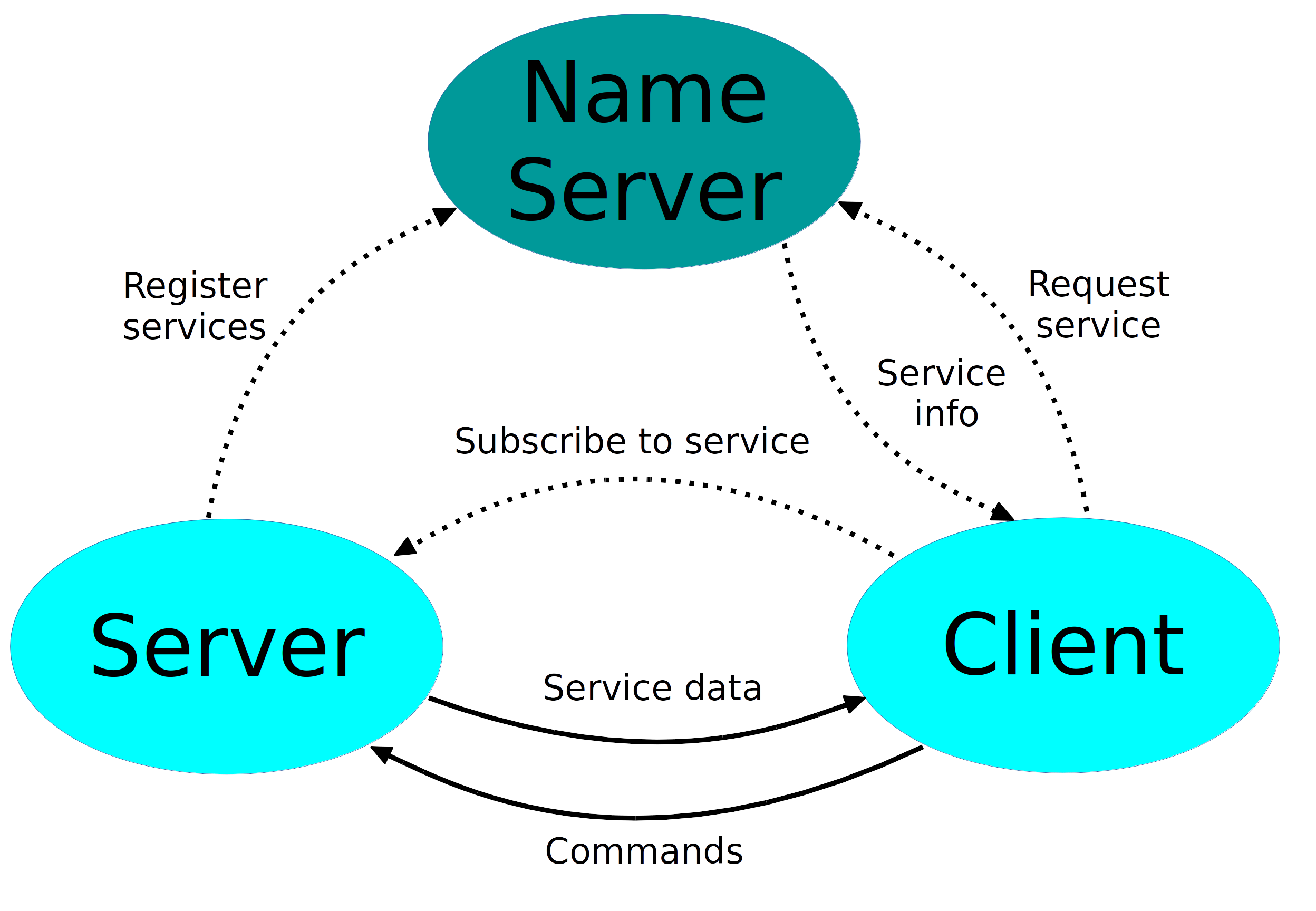
The dns is a single process instance within a network namespace. It has to be run once and all servers and clients refer to one dns. The two other boxes are the servers and the clients:
- the servers register their services at startup to the dns,
- the clients connect to servers with the following steps:
- it connects first to the dns and ask for a particular service by name,
- the dns send back the IP address of the server providing the service,
- the client subscribes directly to the service and starts the communication.
For the client side, note that if the service is not registered on the dns, the client will be notified as soon as the service is available again. This makes e.g server transition easier: you shutdown a server and reconnect it on another host. By doing so, all clients will be notified that the host is different without getting a "connection closed" error.
By default, the dns listen to the port 2505. When a server or a client process starts, the following environment variable can/must be used :
- DIM_DNS_NODE (mandatory), the host on which the dns is running,
- DIM_DNS_PORT (optional), the port on which the dns is listening. By default 2505,
As DIM works with name mapping, it automatically choose which port to open for communication between servers and clients. The port range is defined between 5100 and 6000. The first free port is tried and will use the next one in case of failure.
The implemented patterns
The DIM libray offers three possible patterns or ways to communicate:
- the command pattern. The client sends data to the server.
- the RPC (remote procedure call) pattern. The client requests data from the server. The client sends data and waits for data from the server.
- the publish/subscribe pattern. The client subscribes to a server service. Whenever the server updates the service content, the client receives it.
These three patterns are the simplest forms of communication within a network and provides 99% of the needed functionalities for networking communication. The other possible patterns are actually a combination of these three ones and are needed only in very specific occasions. We will not talk about this here.
Multi-threading aspects
The DIM library uses a single separate thread to handle communications. Within a process:
- only one additional thread is running to communicate,
- only one port is opened to receive data from either the server/client data or for the dns management.
DQMNet as a top-level layer
The DQMNet package builds an additional layer on top of DIM with convenience functions in a c++11 style. It defines how the sent and received data are handled in memory in case the user wants to optimize it (see Buffer class below). The DQMNet package defines also additional default services attached to every server. By using command line tools (see below), one can quickly understand which servers and clients are running and where.
The server side
Writing a server
A server can define:
- a set of commands to receive
- a set of services to publish
- a set of requests to handle
The class that implements the server is dqm4hep::net::Server and may be used as :
#include <dqm4hep/Server.h>

using namespace dqm4hep::net;

int main() {

  Server server("MyServer");
  server.start();

  while(1)
    sleep(1);

  return 0;
}
This simply creates an empty server with name "MyServer" and runs it. Not really interesting ...
Let's add a new service to it !
#include <dqm4hep/Server.h>
#include <dqm4hep/Service.h>
#include <cstdlib>

using namespace dqm4hep::net;

int main() {

  Server server("MyServer");
  Service* service = server.createService("MyService");
  server.start();

  while(1) {
    auto randomValue = rand();
    service->send(randomValue);
    sleep(1);
  }

  return 0;
}
We first have created a service called "MyService". The server is started and the service content is then updated every second with a random value. Every client that connects to this service will receive a random value every second (see Client side below).
Now, instead of a service, we can create a command handler using a user class:
#include <dqm4hep/Server.h>
#include <cstdlib>

using namespace dqm4hep::net;

class MyHandler {
public:
  // Handle a command from clients.
  // Just print the received message
  void handleCommand(const Buffer &buffer) {
    std::string message(buffer.begin(), buffer.size());
    std::cout << "Received message from command: " << message << std::endl;
  }
};

int main() {

  MyHandler handler;
  Server server("MyServer");
  server.createCommandHandler("MyCommand", &handler, &MyHandler::handleCommand);
  server.start();

  while(1)
    sleep(1);

  return 0;
}
The class MyHandler defines a simple method that receives a command from a (any) client and print the received message. The method createCommandHandler() takes the command name as first argument, then the address of the object handling the command and its method. Note that the signature of the class method that handles the command must be "void method(const Buffer &)". If your signature is not correct, the code will not compile, showing an error on the line that create the command handler using the server instance.
If now you want to send back data to the client, do not use a command handler but a request handler:
#include <dqm4hep/Server.h>
#include <cstdlib>

using namespace dqm4hep::net;

class MyHandler {
public:
  // Handle a command from clients.
  // Just print the received message
  void handleRequest(const Buffer &request, Buffer &response) {

    std::string message(buffer.begin(), buffer.size());
    std::cout << "Received message from request: " << message << std::endl;

    // Our response content
    std::stringstream responseMessage;
    responseMessage << "Server response is a random number: " << rand();

    // Create a buffer model that handles our response.
    // Use the factory method of the Buffer class
    auto model = response.createModel<std::string>();

    // Copy our message to the model
    model.copy(responseMessage.str());

    // Set the model in our response buffer
    response.setModel(model);
  }
};

int main() {

  MyHandler handler;
  Server server("MyServer");
  server.createRequestHandler("MyRequest", &handler, &MyHandler::handleRequest);
  server.start();

  while(1)
    sleep(1);

  return 0;
}
The first part of the request handler works in the same way as the command handler. You receive data (request) and the content is simply printed. Sending back is a bit more complex, as the user might want to optimize the memory he is handling. In this example, we define string message with a random number (yes, we love random numbers !). Our response will be handled by a buffer model. We first create a model using the factory method Buffer::createModel< T > and copy our string response into it. The model is then passed to the response buffer and will be sent back to the client.
The memory can be handled in three ways in a model:
- copy the data. Use the BufferModelT< T >::copy() method to make a copy of your response,
- move the data. Use the BufferModelT< T >::move() method to move your data to the model. This is useful when you define local data you want to send to client but remove after this operation. In our example above, we could have used this method to move the string response directly into the model.
- handle the data. Use the BufferModel::handle() method to provide a pointer to your data. This case is a bit more tricky and might be used in case you store a pointer on data on the server that you don't want to be copied nor moved.
The client side
Using the client interface
The client interface is implemented in the dqm4hep::net::Client class part of the DQMNet package. It allows you to communicate with the server class as documented in the previous section. The example below shows how to interact with the server created above in the previous section.
#include <dqm4hep/Client.h>
#include <cstdlib>

using namespace dqm4hep::net;

class MyHandler {
public:
  void handleServiceUpdate(const Buffer &buffer) {
    std::string serviceContent(buffer.begin(), buffer.size());
    std::cout << "Service content is: " << serviceContent << std::endl;
  }
};

int main() {

  Client client;
  Buffer buffer;
  auto model = buffer.createModel<std::string>();
  buffer.setModel(model);

  // Send a command to the server.
  // Set the command content using the model.
  model->copy("This is the command content");
  client.sendCommand("MyCommand", buffer);

  // Send a request to the server.
  // Set the request content using the model (re-use it)
  // After sending the request, the response is passed to
  // the lambda function in the second argument.
  model->copy("This is the request content");
  client.sendRequest("MyRequest", buffer, [](const Buffer &response){
    std::string responseStr(response.begin(), response.size());
    std::cout << "After sending a request, we got the response: " << responseStr << std::endl;
  });

  // Subscribe to a server service.
  // Use the MyHandler class to receive the regular updates from the server
  MyHandler handler;
  client.subscribe("MyService", &handler, &MyHandler::handleServiceUpdate);

  // infinite, wait for service updates
  while(1)
    sleep(1);

  return 0;
}
Let's decompose it step by step.
  Client client;
  Buffer buffer;
  auto model = buffer.createModel<std::string>();
  buffer.setModel(model);
We first start by creating the client interface. We also create the buffer that will handle our messages to send to the server: the command and the request. We create a custom model to handle a string message.
  model->copy("This is the command content");
  client.sendCommand("MyCommand", buffer);
The first line set the data to send in the command. We use the copy() method of the model class to copy our string message into it. We then send the command with the buffer object.
model->copy("This is the request content");
client.sendRequest("MyRequest", buffer, [](const Buffer &response){
  std::string responseStr(response.begin(), response.size());
  std::cout << "After sending a request, we got the response: " << responseStr << std::endl;
});
The first line set the data to send in the request. We again use the copy() method as for the command. Note that the model can be re-used. The buffer is then send with the request. The response of the server has to be handled. To do this, we pass a lambda function as third argument of the sendRequest() method. In this case the lambda function just does a print. More information about c++11 lambda functions can be found on cppreference.com.
  MyHandler handler;
  client.subscribe("MyService", &handler, &MyHandler::handleServiceUpdate);

  while(1)
    sleep(1);
In this piece of code we subscribe to a server service to receive frequent updates. You need to define a user class with a callback method, similarly to, e.g, the command handler on the server side. This function will be called whenever the content is updated on the server. To subscribe to the server service, we use the subscribe() method with the service name, the address of the object handling the service updates and its associated method. The main ends with an infinite loop to handle the frequent service updates.
Command line tools
The DQMNet software comes with a set of command line tools after installation. These tools can interact with any server implemented using the DQMNet library. All of them described below. An example is given using again the example server we have provided above. Before running the example, make sure that:
- the server is started
- the DIM_DNS_NODE variable is exported to the correct dns host in the shell you are using to execute the different listed command above.
dqm4hep-send-command
Usage
$ dqm4hep-send-command
Usage : dqm4hep-send-command command data
Description
Send a command to a server. As a command name is uniquely identified within the dns namespace, no server name has to be provided, just the command name. All other arguments are treated as the content of the command. This tools has the limitation to be able to send only string command.
Examples
$ dqm4hep-send-command MyCommand This is the command content
$ dqm4hep-send-command MyCommand We love random numbers : $RANDOM
dqm4hep-send-request
Usage
$ dqm4hep-send-request
Usage : dqm4hep-send-request name [content]
Description
Send a request to a server and do not wait for the response. The first argument is the request handler name on the server. All other arguments are treated as the content send along with the request (if any). This tools has the limitation to be able to send only string request.
Examples
$ dqm4hep-send-request MyRequest This is the request content
$ dqm4hep-send-request MyRequest
dqm4hep-send-request-response
Usage
$ dqm4hep-send-request-response
Usage : dqm4hep-send-request-response name [content]
Description
Send a request to a server and wait for the server response. The first argument is the request handler name on the server. All other arguments are treated as the content send along with the request (if any). This tools has the limitation to be able to send only string request and to print the response as a string.
Examples
$ dqm4hep-send-request-response MyRequest This is the request content
$ dqm4hep-send-request-response MyRequest
dqm4hep-server-list
Usage
$ dqm4hep-server-list
Usage : dqm4hep-server-list
Description
Get the list of running servers. Among the list of available servers, a server called DIS_DNS is always printed. This server is the central dns server. A various set of command line tools will not work with server (e.g dqm4hep-server-info) as it is part of the DIM library and not DQMNet which build server instances on top of it.
Example
$ dqm4hep-server-list
DIS_DNS TestServer
dqm4hep-server-info
Usage
$ dqm4hep-server-info
Usage : dqm4hep-server-info servername
Description
Query information about the server. The only argument is the server name. The response is printed as a (beautified) json string.
Example
$ dqm4hep-server-info MyServer
{
   "commandHandlers" : [ "MyCommand" ],
   "host" : {
      "machine" : "x86_64",
      "name" : "flc03.desy.de",
      "node" : "flc03.desy.de",
      "release" : "4.4.0-97-generic",
      "system" : "Linux",
      "version" : "#120-Ubuntu SMP Tue Sep 19 17:28:18 UTC 2017"
   },
   "requestHandlers" : [ "MyRequest" ],
   "server" : {
      "name" : "TestServer"
   },
   "services" : [ "MyService" ]
}
dqm4hep-server-running
Usage
$ dqm4hep-server-running
Usage : dqm4hep-server-running servername
Description
Prints 1 if the specified server is actually running. The first argument is the server name. This command also works for the central DIS_DNS server (returns 1). If the server doesn't exist, then it prints 0.
Example
$ dqm4hep-server-running MyServer
1
$ dqm4hep-server-running DIS_DNS
1
$ dqm4hep-server-running SupermanServer
0
dqm4hep-subscribe-service
Usage
$ dqm4hep-subscribe-service
Usage : dqm4hep-subscribe-service name [raw|str|type]
Description
Subscribe to the server service and prints the service contents on update. The first argument is the service name and the second is printout format. Available formats are:
- raw: prints the received buffer in hexadecimal characters. The buffer printout is line-breaked every 100 characters.
- str: prints the received buffer as a string
- type: prints the received buffer in the specified format. Available formats are float, int, uint, double, short, long, ulong, ullong and json.
Example
$ dqm4hep-subscribe-service MyService int
# possible output:
125846
7951368
5878763
4521588
48541
# ... and so on ...